Thursday, February 6, 2025

Patching compliance based on all current month SUG - Dynamic

-- Step 1: Store Latest Software Update Groups (SUGs) in a temp table

DROP TABLE IF EXISTS #LatestSUG;

CREATE TABLE #LatestSUG (Title NVARCHAR(255));


INSERT INTO #LatestSUG (Title)

SELECT Title 

FROM v_AuthListInfo

WHERE 

    (YEAR(DateCreated) = YEAR(GETDATE()) AND MONTH(DateCreated) = MONTH(GETDATE())) 

    OR (YEAR(DateCreated) = YEAR(GETDATE()) AND MONTH(DateCreated) = MONTH(DATEADD(MONTH, -1, GETDATE())))

;


-- Step 2: Store Compliance Data in a temp table to reduce redundant joins

DROP TABLE IF EXISTS #ComplianceData;

CREATE TABLE #ComplianceData (

    ResourceID INT,

    [Patch Title] NVARCHAR(255),

    [Install Status] NVARCHAR(50),

    [Update Group] NVARCHAR(255)

);


INSERT INTO #ComplianceData (ResourceID, [Patch Title], [Install Status], [Update Group])

SELECT 

    ucs.ResourceID,

    ui.Title AS [Patch Title],

    CASE ucs.status 

        WHEN 2 THEN 'Required' 

        WHEN 1 THEN 'NOT REQUIRED' 

        WHEN 0 THEN 'UNKNOWN' 

        WHEN 3 THEN 'Installed' 

    END AS [Install Status],

    v_AuthListInfo.Title AS [Update Group]

FROM v_Update_ComplianceStatusAll AS ucs

INNER JOIN v_UpdateInfo AS ui ON ui.CI_ID = ucs.CI_ID

INNER JOIN v_CIRelation ON v_CIRelation.ToCIID = ui.CI_ID

INNER JOIN v_AuthListInfo ON v_CIRelation.FromCIID = v_AuthListInfo.CI_ID

WHERE v_AuthListInfo.Title IN (SELECT Title FROM #LatestSUG );


-- Step 3: Retrieve the final result set using optimized joins

SELECT 

    sys.Name0 AS [Machine Name],

    CASE 

        WHEN CHARINDEX('OU=', sys.Distinguished_Name0) > 0 

        THEN SUBSTRING(

                sys.Distinguished_Name0, 

                CHARINDEX('OU=', sys.Distinguished_Name0, CHARINDEX('OU=', sys.Distinguished_Name0) + 3) + 3, 

                CHARINDEX(',', sys.Distinguished_Name0, CHARINDEX('OU=', sys.Distinguished_Name0, CHARINDEX('OU=', sys.Distinguished_Name0) + 3)) 

                - CHARINDEX('OU=', sys.Distinguished_Name0, CHARINDEX('OU=', sys.Distinguished_Name0) + 3) - 3

            )

        ELSE NULL

    END AS 'Business_Unit',

    cd.[Patch Title], 

    cd.[Install Status],

    cd.[Update Group]

FROM v_ClientCollectionMembers 

INNER JOIN v_R_System AS sys ON v_ClientCollectionMembers.ResourceID = sys.ResourceID 

INNER JOIN #ComplianceData AS cd ON sys.ResourceID = cd.ResourceID

WHERE v_ClientCollectionMembers.CollectionID = 'ABC02BB3'

ORDER BY [Machine Name];


-- Cleanup: Drop temporary tables

DROP TABLE IF EXISTS #LatestSUG;

DROP TABLE IF EXISTS #ComplianceData;


Patching compliance report based on SUG

 SELECT 

sys.Name0 AS [Machine Name],

ui.Title AS [Patch Title], 

(CASE ucs.status WHEN 2 THEN 'Required' WHEN 1 THEN 'NOT REQUIRED' WHEN 0 THEN 'INSTALL STATE UNKNOWN' WHEN 3 THEN 'Installed' END) AS [Install Status],

v_AuthListInfo.Title AS [Update Group]

FROM v_ClientCollectionMembers 

INNER JOIN v_R_System AS sys ON v_ClientCollectionMembers.ResourceID = sys.ResourceID LEFT OUTER JOIN

v_CIRelation INNER JOIN

v_UpdateInfo AS ui INNER JOIN

v_UpdateComplianceStatus AS ucs ON ui.CI_ID = ucs.CI_ID ON v_CIRelation.ToCIID = ui.CI_ID INNER JOIN

v_AuthListInfo ON v_CIRelation.FromCIID = v_AuthListInfo.CI_ID ON sys.ResourceID = ucs.ResourceID

GROUP BY sys.Name0, ucs.Status, v_AuthListInfo.Title,   ui.Title,v_ClientCollectionMembers.CollectionID

HAVING  (v_AuthListInfo.Title LIKE 'Update Compliance Reporting - Jan 2025') AND (v_ClientCollectionMembers.CollectionID LIKE 'ABC02502')

ORDER BY [Machine Name]

SCCM SQL Current Month Patching report

-- edge will get superseded very frequently that may not come in this report

WITH LatestPatches AS (

    SELECT DISTINCT

        v_R_System.Name0 AS 'Device Name',

        CASE 

            WHEN CHARINDEX('OU=', v_R_System.Distinguished_Name0) > 0 

            THEN SUBSTRING(

                    v_R_System.Distinguished_Name0, 

                    CHARINDEX('OU=', v_R_System.Distinguished_Name0) + 3, 

                    CHARINDEX(',', v_R_System.Distinguished_Name0, CHARINDEX('OU=', v_R_System.Distinguished_Name0)) - CHARINDEX('OU=', v_R_System.Distinguished_Name0) - 3

                )

            ELSE NULL

        END AS 'OU',

case 

when v_R_System.Operating_System_Name_and0 like '%server%' then 'Server' 

when v_R_System.Operating_System_Name_and0 like '%workstation 6%' then 'Windows 7'

when v_R_System.Operating_System_Name_and0 like '%workstation 5%' then 'Windows XP'

when v_R_System.Operating_System_Name_and0 like '%workstation 10%' and v_R_System.Build01 like '%26100%'  then 'Windows 11 Build 24H2'

when v_R_System.Operating_System_Name_and0 like '%workstation 10%' and v_R_System.Build01 like '%22631%'  then 'Windows 11 Build 23H2'

when v_R_System.Operating_System_Name_and0 like '%workstation 10%' and v_R_System.Build01 like '%19045%'  then 'Windows 10 Build 22H2'

when v_R_System.Operating_System_Name_and0 like '%workstation 10%' and v_R_System.Build01 like '%22621%'  then 'Windows 11 Build 22H2'

when v_R_System.Operating_System_Name_and0 like '%workstation 10%' and v_R_System.Build01 like '%17134%'  then 'Windows 10 Build 1803'

when v_R_System.Operating_System_Name_and0 like '%workstation 10%' and v_R_System.Build01 like '%22000%'  then 'Windows 11 Build 21H2'

when v_R_System.Operating_System_Name_and0 like '%workstation 10%' and v_R_System.Build01 like '%19044%'  then 'Windows 10 Build 21H2'

when v_R_System.Operating_System_Name_and0 like '%workstation 10%' and v_R_System.Build01 like '%19043%'  then 'Windows 10 Build 21H1'

when v_R_System.Operating_System_Name_and0 like '%workstation 10%' and v_R_System.Build01 like '%19042%'  then 'Windows 10 Build 20H2'

when v_R_System.Operating_System_Name_and0 like '%workstation 10%' and v_R_System.Build01 like '%19041%'  then 'Windows 10 Build 2004'

when v_R_System.Operating_System_Name_and0 like '%workstation 10%' and v_R_System.Build01 like '%18363%'  then 'Windows 10 Build 1909'

when v_R_System.Operating_System_Name_and0 like '%workstation 10%' and v_R_System.Build01 like '%18362%'  then 'Windows 10 Build 1903'

when v_R_System.Operating_System_Name_and0 like '%workstation 10%' and v_R_System.Build01 like '%17763%'  then 'Windows 10 Build 1809'

when v_R_System.Operating_System_Name_and0 like '%workstation 10%' and v_R_System.Build01 like '%16299%'  then 'Windows 10 Build 1709'

when v_R_System.Operating_System_Name_and0 like '%workstation 10%' and v_R_System.Build01 like '%15063%'  then 'Windows 10 Build 1703'

when v_R_System.Operating_System_Name_and0 like '%workstation 10%' and v_R_System.Build01 like '%14393%'  then 'Windows 10 Build 1607'

when v_R_System.Operating_System_Name_and0 like '%workstation 10%' and v_R_System.Build01 like '%10240%'  then 'Windows 10 Build 1507'

when v_R_System.Operating_System_Name_and0 like '%workstation 10%' and v_R_System.Build01 like '%10586%'  then 'Windows 10 Build 1511'

when v_R_System.Operating_System_Name_and0 like '%workstation 10%' and v_R_System.Build01 is NULL then 'Windows 10 Build not specified'

else v_R_System.Operating_System_Name_and0

end as 'O/S',

cls.CategoryInstanceName 'Patch Type',

        V_UpdateInfo.Title AS 'Update Title',

        CASE

            WHEN v_Update_ComplianceStatus.Status = '2' THEN 'MISSING'

            WHEN v_Update_ComplianceStatus.Status = '3' THEN 'INSTALLED'

            ELSE 'UNKNOWN'

        END AS 'Patch Status',

        V_UpdateInfo.DateCreated

    FROM v_R_System

    -- Join Compliance Status

    LEFT JOIN v_Update_ComplianceStatus 

        ON v_R_System.ResourceID = v_Update_ComplianceStatus.ResourceID

    -- Join Updates

    LEFT JOIN V_UpdateInfo 

        ON v_Update_ComplianceStatus.CI_ID = V_UpdateInfo.CI_ID

    -- Join Update Categories

    JOIN v_CICategoryInfo_All cls 

        ON cls.CI_ID = V_UpdateInfo.CI_ID 

        AND cls.CategoryTypeName = 'UpdateClassification'

    -- Join Collection Filter

    JOIN v_FullCollectionMembership fcm 

        ON v_R_System.ResourceID = fcm.ResourceID

    JOIN v_Collection col

        ON fcm.CollectionID = col.CollectionID

    -- Filters for Updates

    WHERE 

        V_UpdateInfo.IsDeployed = 1 

        AND V_UpdateInfo.IsExpired = 0 

        AND V_UpdateInfo.IsSuperseded = 0 

  --  AND v_UpdateInfo.CIType_ID = 8  -- Only software updates

    AND V_UpdateInfo.Title NOT LIKE '%Server%'  -- Exclude Server patches

    AND V_UpdateInfo.Title NOT LIKE '%Feature Update%'  -- Exclude Feature Updates

    AND V_UpdateInfo.Title NOT LIKE '%Driver%'  -- Exclude Drivers

AND V_UpdateInfo.Title NOT LIKE '%HP Services Scan for Commercial%'  -- Exclude Drivers

    AND V_UpdateInfo.Title NOT LIKE '%Seamless Firmware Update Service%'  -- Exclude Drivers


AND (cls.CategoryInstanceName ='Critical Updates' 

OR cls.CategoryInstanceName ='Security Updates' 

OR cls.CategoryInstanceName ='Update Rollups' 

OR cls.CategoryInstanceName ='Updates'

)

AND fcm.CollectionID = 'ABC01022'

)

-- Check if current month's patches exist

SELECT * 

FROM LatestPatches 

WHERE FORMAT(DateCreated, 'yyyy-MM') = FORMAT(GETDATE(), 'yyyy-MM')


UNION ALL


-- If no current month patches exist, take last month's patches

SELECT * 

FROM LatestPatches 

WHERE FORMAT(DateCreated, 'yyyy-MM') = FORMAT(DATEADD(MONTH, -1, GETDATE()), 'yyyy-MM')

AND NOT EXISTS (

    SELECT 1 

    FROM LatestPatches 

    WHERE FORMAT(DateCreated, 'yyyy-MM') = FORMAT(GETDATE(), 'yyyy-MM')

);


Tuesday, December 10, 2024

Adding devices to SCCM collection using query method

 Overview

 The "Add Machines to Collection" tool is a simple, user-friendly UI-based solution designed to quickly add machines to an SCCM collection. By specifying a collection ID and providing a text file with machine names, this tool automatically updates the collection and displays the results on the screen.

 Features

                 - Collection ID Input: Specify the target SCCM collection ID.

- Text File Selection: Upload a text file containing the list of machine names or IDs.

- Run Button: Start the process to add the listed machines to the specified collection.

- Output Display: View the result of the operation directly on the tool's interface.

 Instructions

1. Launch the Tool: Open the executable or script for the "Add Machines to Collection" tool.

 2. Enter Collection ID:

   - In the provided field, input the desired SCCM collection ID where machines will be added.

3. Select Text File:

   - Click on the "Browse" button to select a text file containing the list of machine names.

   - Ensure the file contains one machine name per line.

 4. Click Run:

   - Hit the "Run" button to execute the process.

 5. View Results:

   - Once the operation completes, the tool will display the output below the interface. This output includes a summary of the machines added and any potential errors encountered during the process.

 Requirements

- A valid SCCM environment.

- Collection ID must exist in SCCM.

- A properly formatted text file with machine names (one per line).


Troubleshooting

 - If an error occurs, verify the following:

                  1. The collection ID is correct and exists in SCCM.

  2. The text file is formatted correctly with valid machine names.


Here is the download link from Github

Friday, December 6, 2024

Add-MachinesToSCCMCollection

The function takes the SCCM collection ID, a path to a text file containing the list of machines, and a batch size (defaulting to 700 machines per collection). It divides the machines into batches and adds them to the collection using query membership rules.


Usage:

Save this script to a .ps1 file.

Call the Add-MachinesToSCCMCollection function, providing the necessary parameters like CollectionID and TextFilePath.

Optionally, modify the BatchSize parameter if you want a different number of machines per query.


function Add-MachinesToSCCMCollection {

    param (

        [string]$CollectionID,                

        [string]$TextFilePath,                

        [int]$BatchSize = 700                

    )

    if (-not (Test-Path -Path $TextFilePath)) {

        Write-Error "File not found: $TextFilePath"

        return

    }

    $machineNames = Get-Content -Path $TextFilePath

    if ($machineNames.Count -eq 0) {

        Write-Error "The file is empty or contains invalid data: $TextFilePath"

        return

    }

    $batches = @()

    for ($i = 0; $i -lt $machineNames.Count; $i += $BatchSize) {

        $batches += ,@($machineNames[$i..[Math]::Min($i + $BatchSize - 1, $machineNames.Count - 1)])

    }

    foreach ($batch in $batches) {

        $query = @"

select SMS_R_SYSTEM.ResourceID,

       SMS_R_SYSTEM.ResourceType,

       SMS_R_SYSTEM.Name,

       SMS_R_SYSTEM.SMSUniqueIdentifier,

       SMS_R_SYSTEM.ResourceDomainORWorkgroup,

       SMS_R_SYSTEM.Client

from SMS_R_System

where Name in ('$($batch -join "','")')

"@

        $ruleName = "query-$($batches.IndexOf($batch) + 1)"

        try {

            Add-CMDeviceCollectionQueryMembershipRule -CollectionId $CollectionID -RuleName $ruleName -QueryExpression $query

            Write-Host "Successfully added rule '$ruleName' to collection '$CollectionID'."

        } catch {

            Write-Error "Failed to add rule '$ruleName': $_"

        }

    }

}


Friday, October 25, 2024

Trigger remote machine SCCM Baseline

 function Invoke-BLEvaluation

{

 param (

 [String][Parameter(Mandatory=$true, Position=1)] $ComputerName,

 [String][Parameter(Mandatory=$False, Position=2)] $BLName

 )

 If ($BLName -eq $Null)

{

 $Baselines = Get-WmiObject -ComputerName $ComputerName -Namespace root\ccm\dcm -Class SMS_DesiredConfiguration

}

 Else

{

 $Baselines = Get-WmiObject -ComputerName $ComputerName -Namespace root\ccm\dcm -Class SMS_DesiredConfiguration | Where-Object {$_.DisplayName -like $BLName}

}

$Baselines | % {

 ([wmiclass]"\\$ComputerName\root\ccm\dcm:SMS_DesiredConfiguration").TriggerEvaluation($_.Name, $_.Version) 

 }

 }

Monday, August 26, 2024

To Remove Disconnected Session

 function Remove-DisconnectedSessions {

    # Get all user sessions on the machine

    $sessions = query user

    foreach ($session in $sessions) {

        # Split the session details into an array

        $sessionDetails = $session -split '\s+'

        # Check if the session state is 'Disc' (Disconnected)

        if ($sessionDetails[3] -eq 'Disc') {

            $sessionId = $sessionDetails[2]

            # Log off the disconnected session

            logoff $sessionId

            Write-Host "Disconnected session with ID $sessionId has been logged off."

        }

    }

}

Remove-DisconnectedSessions


This can be used in SCCM Script and run against any Device collection

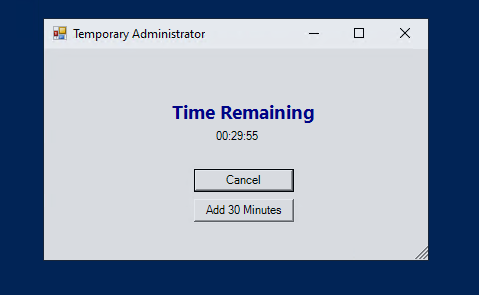
Temporary Admin Rights Script for SCCM/ MECM

Script for Granting Temporary Admin Rights for End User's

The  Temporary Admin Rights script has been enhanced to grant temporary administrative rights to the currently logged-in user. The script identifies the user by determining the owner of the explorer.exe process and adds them to the local administrators' group with a set timer. Once the timer expires, the user is automatically removed from the admin group. Additionally, the script includes a GUI with a button that allows the user to extend the admin rights by 30-minute increments, up to a maximum of 6 hours.

Key Features:

User Identification: The script identifies the currently logged-in user by finding the owner of the explorer.exe process.

Admin Rights Management: Admin rights are granted using the PowerShell Add-LocalGroupMember cmdlet, and they are removed using the Remove-LocalGroupMember cmdlet. The use of PowerShell avoids the appearance of a command prompt window on the desktop.

Timer Functionality: A timer counts down the time remaining for the admin rights. Once the timer runs out, the user is removed from the admin group.

GUI Interface: The script includes a graphical interface that displays the time remaining in hours, minutes, and seconds. It also provides an "Add 30 minutes" button to extend the timer.

Deployment in SCCM: The script was packaged as an SCCM application / package and configured to run in the user context. Extensive testing confirmed that the script works as intended, providing a seamless experience for users requiring temporary administrative privileges.


Script is available to download from GitHub


Friday, August 16, 2024

Enhancing SCCM/MECM AD Group Deployment with Our Upgraded PowerShell Tool

I'm excited to share the latest update to our PowerShell tool designed for SCCM/MECM AD Group deployments. This upgrade brings several new features and improvements that enhance our deployment processes and streamline our workflow.

Key Features of the Upgraded Tool:


1. Dual Deployment Capability: Previously, our tool only supported application deployments. With this upgrade, it now supports both application and package deployments, providing greater flexibility and efficiency.


2. New Collection Creation: The tool can now create new collections, making it easier to organize and manage deployments. Once the collection is created, the tool can deploy applications and packages to it seamlessly.


3. Support for Existing AD Group Collections: In addition to creating new collections, the tool can also deploy applications and packages to existing AD group collections, simplifying the integration with our current infrastructure.


4. Automated Collection Variables: To ensure smooth deployments, the tool adds collection variables automatically, reducing the need for manual intervention and minimizing errors.


5. Proper Folder Placement: The tool ensures that both applications and packages, along with collections, are placed in the correct folders within SCCM. This organization helps maintain a tidy and efficient deployment environment.


6. Automated Deployment Creation: After performing all the above steps, the tool automatically creates the deployment, saving valuable time and effort.


7. Email Notifications for Validation: The tool will continue to send email notifications with the same details as before for validation of the deployment, ensuring that our processes remain transparent and verified.


8. User Collection Creation: The tool can now create user collections and deploy to them. Simply enable the "If user" checkbox to utilize this feature.


Conclusion:

These enhancements are designed to improve our deployment processes, increase accuracy, and save time. By automating several key steps, we can focus on more strategic tasks and ensure our deployment operations run smoothly.


Feel free to reach out if you have any questions or need more information about the upgraded tool.


Here is the image from the tool.


Here is the link to download the Script

Saturday, July 27, 2024

MECM Deployment Kit

Streamlining Deployments with a GUI Tool Built on PowerShell

In our ongoing efforts to enhance efficiency and streamline our deployment processes, we have Upgraded our previously built PowerShell GUI Tool. This tool simplifies the deployment process and ensures that all necessary conditions and notifications are met. Once a deployment is created, the tool automatically sends an email to our distribution list (DL), keeping all relevant parties informed.

 Deployable Objects

The tool supports the deployment of the following objects:
    - Applications
    - Packages
    - Task Sequences (Non-Imaging)

Deployment Targets

Deployments can be made to:
    - User Collections
    - Device Collections

Key Conditions

To maintain a smooth and error-free deployment process, the following conditions must be adhered to:

1. Exclusion of Default Collections
   - Collections starting with "SMS" are default collections and cannot be used for deployments.

2. Validation for Required Deployments
   - Required deployments will not allow you to use collections with any members. After the validation is complete, devices can be added to the collection.

3. Time Restrictions
   - For both available and required deployments, you cannot use a time that is earlier than the current time.

4. Notification Settings
   - Notification settings are integrated for package and task sequence deployments to ensure all necessary parties are informed promptly.


How It Works

1. Select the Object to Deploy
   - Choose from applications, packages, or task sequences.

2. Choose the Target Collection
   - Select either a user collection or a device collection for the deployment. (Enable checkbox for user collection)

3. Adhere to Conditions
   - Ensure that no default collections are used, and validate collections for required deployments.
   - Set the deployment time to ensure it is not earlier than the current time.

4. Deployment Notification
   - Upon creating a deployment, the tool will send an email notification to the designated distribution list, providing details of the deployment.


Benefits


- Ease of Use
  - The GUI tool provides a user-friendly interface that simplifies the deployment process.
  
- Automated Notifications
  - Automatic email notifications keep everyone informed about the status and details of deployments.

- Compliance with Conditions
  - The tool enforces conditions to prevent common deployment errors, ensuring smoother operations.

- Versatility
  - Supports a wide range of deployment objects and targets, catering to various needs.

By integrating this GUI tool into our deployment workflow, we have significantly improved efficiency and reduced the likelihood of errors. This tool exemplifies our commitment to leveraging technology to streamline processes and enhance operational effectiveness.

Feel free to reach out with any questions or feedback about using the GUI tool for deployments.


Screenshot of GUI Tool

Application Deployment 
                                    

Email Sample after deployment creation -Application


===============================================
Package Deployment


Email Sample after deployment creation -Package 


=========================================================
Task Sequence Deployment (Non Imaging TS only)


Email Sample after deployment creation - Task Sequence


------------------------------------------------------------------------------------

Script is available to download from GitHub


Tuesday, July 2, 2024

MECM SQL query to get application deployment type and its details


;WITH XMLNAMESPACES ( DEFAULT 'http://schemas.microsoft.com/SystemsCenterConfigurationManager/2009/06/14/Rules', 'http://schemas.microsoft.com/SystemCenterConfigurationManager/2009/AppMgmtDigest' as p1)

SELECT

A.[App Name],max(A.[DT Name])[DT Title],A.Type

,A.ContentLocation ,A.InstallCommandLine,A.UninstallCommandLine,A.ExecutionContext,A.RequiresLogOn

,A.UserInteractionMode,A.OnFastNetwork,A.OnSlowNetwork,A.DetectAction

from (

SELECT LPC.DisplayName [App Name]

,(LDT.SDMPackageDigest.value('(/p1:AppMgmtDigest/p1:DeploymentType/p1:Title)[1]', 'nvarchar(max)')) AS [DT Name]

,LDT.SDMPackageDigest.value('(/p1:AppMgmtDigest/p1:DeploymentType/p1:Installer/@Technology)[1]', 'nvarchar(max)') AS [Type]

,LDT.SDMPackageDigest.value('(/p1:AppMgmtDigest/p1:DeploymentType/p1:Installer/p1:Contents/p1:Content/p1:Location)[1]', 'nvarchar(max)') AS [ContentLocation]

,LDT.SDMPackageDigest.value('(/p1:AppMgmtDigest/p1:DeploymentType/p1:Installer/p1:InstallAction/p1:Args/p1:Arg)[1]', 'nvarchar(max)') AS [InstallCommandLine]

,LDT.SDMPackageDigest.value('(/p1:AppMgmtDigest/p1:DeploymentType/p1:Installer/p1:UninstallAction/p1:Args/p1:Arg)[1]', 'nvarchar(max)') AS [UninstallCommandLine]

,LDT.SDMPackageDigest.value('(/p1:AppMgmtDigest/p1:DeploymentType/p1:Installer/p1:InstallAction/p1:Args/p1:Arg)[3]', 'nvarchar(max)') AS [ExecutionContext]

,LDT.SDMPackageDigest.value('(/p1:AppMgmtDigest/p1:DeploymentType/p1:Installer/p1:InstallAction/p1:Args/p1:Arg)[4]', 'nvarchar(max)') AS [RequiresLogOn]

,LDT.SDMPackageDigest.value('(/p1:AppMgmtDigest/p1:DeploymentType/p1:Installer/p1:InstallAction/p1:Args/p1:Arg)[8]', 'nvarchar(max)') AS [UserInteractionMode]

,LDT.SDMPackageDigest.value('(/p1:AppMgmtDigest/p1:DeploymentType/p1:Installer/p1:Contents/p1:Content/p1:OnFastNetwork)[1]', 'nvarchar(max)') AS [OnFastNetwork]

,LDT.SDMPackageDigest.value('(/p1:AppMgmtDigest/p1:DeploymentType/p1:Installer/p1:Contents/p1:Content/p1:OnSlowNetwork)[1]', 'nvarchar(max)') AS [OnSlowNetwork]

,LDT.SDMPackageDigest.value('(/p1:AppMgmtDigest/p1:DeploymentType/p1:Installer/p1:DetectAction/p1:Provider)[1]', 'nvarchar(max)') AS DetectAction

FROM

dbo.fn_ListApplicationCIs(1033) LPC

RIGHT Join fn_ListDeploymentTypeCIs(1033) LDT ON LDT.AppModelName = LPC.ModelName

--where LDT.CIType_ID = 21 AND LDT.IsLatest = 1

) A

GROUP BY A.[App Name],A.Type,A.ContentLocation,A.InstallCommandLine,A.UninstallCommandLine,A.ExecutionContext,A.RequiresLogOn,A.UserInteractionMode,

A.OnFastNetwork,A.OnSlowNetwork,A.DetectAction


Friday, November 10, 2023

SCCM Application Deployment Tool

SCCM Application Deployment Tool

Streamlining SCCM Application Deployments: Introducing the SCCM Application Deployment Tool.

In the realm of System Center Configuration Manager (SCCM), application deployments play a pivotal role in ensuring that software reaches client machines seamlessly. However, the challenge lies in maintaining deployment consistency and catching potential issues before they impact end-users. To address this, we've developed the SCCM Application Deployment Tool — a straightforward solution designed to enhance the deployment process and provide valuable insights into its success.

## Key Features:

 ### Deployment Validation with a Twist

 One standout feature of our tool is the 30-minute deployment delay. This intentional pause allows deployment teams to catch potential issues before they hit client machines hard. Think of it as a safety net, giving you the opportunity to review and validate deployments, ensuring a smoother user experience.

### Email Notifications for Effective Communication

 Communication is key, especially in the fast-paced world of IT deployments. Our tool sends email notifications to specified distribution lists and selected approvers, keeping everyone in the loop. This not only enhances collaboration but also establishes accountability throughout the deployment process.


### Hardcoded Simplicity

 Recognizing the need for simplicity and to prevent accidental deletions, all configurations are hardcoded directly within the script. While we acknowledge that this may not be the most flexible approach, it aims to streamline the deployment process for application teams. Customization can still be achieved by modifying the script itself.


This is how the tool looks


This is the email that is received for each deployment.


**Download the SCCM Application Deployment Tool and start streamlining your deployments today!**


[Link to download the tool]


We're excited to hear your thoughts. Feel free to reach out with feedback, suggestions, or even to share how the SCCM Application Deployment Tool has improved your deployment processes.

Tuesday, December 6, 2022

SCCM SQL query for Application deployment status with Error code

 select distinct

s1.netbios_name0 as 'Computer Name',

GS.Caption0 as 'OS',

s1.User_Name0 as 'User Name',

aa.ApplicationName,

aa.CollectionName as 'Target Collection',

case

when ae.AppEnforcementState = 1000 then 'Success'

when ae.AppEnforcementState = 1001 then 'Already Compliant'

when ae.AppEnforcementState = 1002 then 'Simulate Success'

when ae.AppEnforcementState = 2000 then 'In Progress'

when ae.AppEnforcementState = 2001 then 'Waiting for Content'

when ae.AppEnforcementState = 2002 then 'Installing'

when ae.AppEnforcementState = 2003 then 'Restart to Continue'

when ae.AppEnforcementState = 2004 then 'Waiting for maintenance window'

when ae.AppEnforcementState = 2005 then 'Waiting for schedule'

when ae.AppEnforcementState = 2006 then 'Downloading dependent content'

when ae.AppEnforcementState = 2007 then 'Installing dependent content'

when ae.AppEnforcementState = 2008 then 'Restart to complete'

when ae.AppEnforcementState = 2009 then 'Content downloaded'

when ae.AppEnforcementState = 2010 then 'Waiting for update'

when ae.AppEnforcementState = 2011 then 'Waiting for user session reconnect'

when ae.AppEnforcementState = 2012 then 'Waiting for user logoff'

when ae.AppEnforcementState = 2013 then 'Waiting for user logon'

when ae.AppEnforcementState = 2014 then 'Waiting to install'

when ae.AppEnforcementState = 2015 then 'Waiting retry'

when ae.AppEnforcementState = 2016 then 'Waiting for presentation mode'

when ae.AppEnforcementState = 2017 then 'Waiting for Orchestration'

when ae.AppEnforcementState = 2018 then 'Waiting for network'

when ae.AppEnforcementState = 2019 then 'Pending App-V Virtual Environment'

when ae.AppEnforcementState = 2020 then 'Updating App-V Virtual Environment'

when ae.AppEnforcementState = 3000 then 'Requirements not met'

when ae.AppEnforcementState = 3001 then 'Host platform not applicable'

when ae.AppEnforcementState = 4000 then 'Unknown'

when ae.AppEnforcementState = 5000 then 'Deployment failed'

when ae.AppEnforcementState = 5001 then 'Evaluation failed'

when ae.AppEnforcementState = 5002 then 'Deployment failed'

when ae.AppEnforcementState = 5003 then 'Failed to locate content'

when ae.AppEnforcementState = 5004 then 'Dependency installation failed'

when ae.AppEnforcementState = 5005 then 'Failed to download dependent content'

when ae.AppEnforcementState = 5006 then 'Conflicts with another application deployment'

when ae.AppEnforcementState = 5007 then 'Waiting retry'

when ae.AppEnforcementState = 5008 then 'Failed to uninstall superseded deployment type'

when ae.AppEnforcementState = 5009 then 'Failed to download superseded deployment type'

when ae.AppEnforcementState = 5010 then 'Failed to updating App-V Virtual Environment'

End as 'Status',

apr.ErrorCode

from v_R_System s1

left join vAppDTDeploymentResultsPerClient ae on ae.ResourceID = s1.ResourceID

left join v_ApplicationAssignment aa on ae.AssignmentID = aa.AssignmentID

left join v_GS_OPERATING_SYSTEM GS on GS.ResourceID=S1.ResourceID

left join vAppDeploymentErrorAssetDetails apr on s1.ResourceID=apr.MachineID and aa.AssignmentID=apr.AssignmentID

where aa.AssignmentID = '16790885'

order by s1.Netbios_Name0

Monday, November 28, 2022

SCCM SQL Query to get list of applications from a specific folder in the console.

 select 

app.DisplayName,

app.Description,

fol.objectpath,

app.CreatedBy,

app.LastModifiedBy,

app.DateCreated,

app.DateLastModified,

assgn.CollectionName [Deployed Collection]

from fn_ListLatestApplicationCIs(1033) app

left join v_ConfigurationItems conf on app.CI_UniqueID = conf.cI_uniqueID 

full join v_ApplicationAssignment assgn on conf.CI_UniqueID=assgn.AssignedCI_UniqueID

JOIN vFolderMembers fol ON fol.InstanceKey = conf.modelName

JOIN vSMS_Folders sms on fol.ContainerNodeID = sms.ContainerNodeID

where fol.objectpath like '/PROD/Application  Deployment/Test' or fol.objectpath like '/DEV/Test' or fol.objectpath like '/CAS/Application Deployment/Test'

order by fol.objectpath


Replace the folder name where its highlighted.

Thursday, November 24, 2022

SCCM SQL query for OS build numbers

If we try to get OS and Build number information from V_GS_OperatingSystem, it may not uptodate if Hardware inventory is not updated.

If we need OS and build number information, even if the Client is not updated with recent Hardware inventory then we can use V_R_Sytem.


select sys.Name0 as 'Hostname',

sys.User_Name0 as 'Username',

case 

when sys.Operating_System_Name_and0 like '%server%' then 'Server' 

when sys.Operating_System_Name_and0 like '%workstation 6%' then 'Windows 7'

when sys.Operating_System_Name_and0 like '%workstation 5%' then 'Windows XP'

when sys.Operating_System_Name_and0 like '%workstation 10%' and sys.Build01 like '%19045%'  then 'Windows 10 Build 22H2'

when sys.Operating_System_Name_and0 like '%workstation 10%' and sys.Build01 like '%22621%'  then 'Windows 11 Build 22H2'

when sys.Operating_System_Name_and0 like '%workstation 10%' and sys.Build01 like '%17134%'  then 'Windows 10 Build 1803'

when sys.Operating_System_Name_and0 like '%workstation 10%' and sys.Build01 like '%22000%'  then 'Windows 11 Build 21H2'

when sys.Operating_System_Name_and0 like '%workstation 10%' and sys.Build01 like '%19044%'  then 'Windows 10 Build 21H2'

when sys.Operating_System_Name_and0 like '%workstation 10%' and sys.Build01 like '%19043%'  then 'Windows 10 Build 21H1'

when sys.Operating_System_Name_and0 like '%workstation 10%' and sys.Build01 like '%19042%'  then 'Windows 10 Build 20H2'

when sys.Operating_System_Name_and0 like '%workstation 10%' and sys.Build01 like '%19041%'  then 'Windows 10 Build 2004'

when sys.Operating_System_Name_and0 like '%workstation 10%' and sys.Build01 like '%18363%'  then 'Windows 10 Build 1909'

when sys.Operating_System_Name_and0 like '%workstation 10%' and sys.Build01 like '%18362%'  then 'Windows 10 Build 1903'

when sys.Operating_System_Name_and0 like '%workstation 10%' and sys.Build01 like '%17763%'  then 'Windows 10 Build 1809'

when sys.Operating_System_Name_and0 like '%workstation 10%' and sys.Build01 like '%16299%'  then 'Windows 10 Build 1709'

when sys.Operating_System_Name_and0 like '%workstation 10%' and sys.Build01 like '%15063%'  then 'Windows 10 Build 1703'

when sys.Operating_System_Name_and0 like '%workstation 10%' and sys.Build01 like '%14393%'  then 'Windows 10 Build 1607'

when sys.Operating_System_Name_and0 like '%workstation 10%' and sys.Build01 like '%10240%'  then 'Windows 10 Build 1507'

when sys.Operating_System_Name_and0 like '%workstation 10%' and sys.Build01 like '%10586%'  then 'Windows 10 Build 1511'

when sys.Operating_System_Name_and0 like '%workstation 10%' and sys.Build01 is NULL then 'Windows 10 Build not specified'

else sys.Operating_System_Name_and0

end as 'O/S',

cs.Manufacturer0 [Make],

cs.Model0 [Model],

bios.SMBIOSBIOSVersion0

from V_R_system sys

left join v_gs_operating_system os on sys.ResourceID=os.ResourceID

left join v_FullCollectionMembership col on sys.ResourceID = col.ResourceID

LEFT JOIN v_GS_COMPUTER_SYSTEM cs on sys.ResourceID=cs.ResourceID

left JOIN v_GS_PC_BIOS BIOS ON sys.ResourceID=BIOS.ResourceID

where col.CollectionID = 'DEV01F7F'

Wednesday, October 26, 2022

WQL query to create SCCM collection based on patch deployment status

select 

SMS_R_SYSTEM.ResourceID,

SMS_R_SYSTEM.ResourceType,

SMS_R_SYSTEM.Name,

SMS_R_SYSTEM.SMSUniqueIdentifier,

SMS_R_SYSTEM.ResourceDomainORWorkgroup,

SMS_R_SYSTEM.Client

from SMS_R_System

inner join   SMS_SUMDeploymentAssetDetails on   SMS_SUMDeploymentAssetDetails.ResourceID = SMS_R_System.ResourceId 

where SMS_SUMDeploymentAssetDetails.AssignmentID = "10700151"   and SMS_SUMDeploymentAssetDetails.StatusType = "1"


Status type.

Value Status type

1         Success

2         InProgress

4         Unknown

5         Error


With Specific Deployment status 


select 

SYS.ResourceID,

SYS.ResourceType,

SYS.Name,

SYS.SMSUniqueIdentifier,

SYS.ResourceDomainORWorkgroup,

SYS.Client

from sms_r_system as sys inner join SMS_SUMDeploymentAssetDetails as offer on sys.ResourceID=offer.ResourceID 

WHERE offer.AssignmentID IN ('16794400') AND offer.StatusDescription = 'Pending system restart'


If you like to test it via Powershell to find out the column name to filter, try like below.

#Patches 

$SCCMPrimaryServername = 'server-105'

$SiteCode = 'AOL'

Get-WmiObject -ComputerName $SCCMPrimaryServername -Namespace root\sms\site_$SiteCode -Class SMS_SUMDeploymentAssetDetails  -Filter 'AssignmentID = "19700191"' | select DeviceName


WQL query to create SCCM collection based on Package deployment status

select 

SMS_R_SYSTEM.ResourceID,

SMS_R_SYSTEM.ResourceType,

SMS_R_SYSTEM.Name,

SMS_R_SYSTEM.SMSUniqueIdentifier,

SMS_R_SYSTEM.ResourceDomainORWorkgroup,

SMS_R_SYSTEM.Client

 from SMS_R_System

 inner join SMS_ClassicDeploymentAssetDetails on SMS_ClassicDeploymentAssetDetails.DeviceID = SMS_R_System.ResourceId 

where SMS_ClassicDeploymentAssetDetails.DeploymentID = 'ABC20140' and SMS_ClassicDeploymentAssetDetails.StatusType = '1'


Status type.


Value Status type

1 Success

2 InProgress

4 Unknown

5 Error


If you like to test it via powershell,

#Package 

$SCCMPrimaryServername = 'Server-25'

$SiteCode = 'AOL'


Get-WmiObject -ComputerName $SCCMPrimaryServername -Namespace root\sms\site_$SiteCode -Class SMS_ClassicDeploymentAssetDetails  -Filter 'DeploymentID = "AOL20140"' | select Devicename,StatusDescription


WQL query to create SCCM collection based on Application deployment status

 select 

SMS_R_SYSTEM.ResourceID,

SMS_R_SYSTEM.ResourceType,

SMS_R_SYSTEM.Name,

SMS_R_SYSTEM.SMSUniqueIdentifier,

SMS_R_SYSTEM.ResourceDomainORWorkgroup,

SMS_R_SYSTEM.Client

 from SMS_R_System

  inner join   SMS_AppDeploymentAssetDetails   on   SMS_AppDeploymentAssetDetails.MachineID = SMS_R_System.ResourceId 

where SMS_AppDeploymentAssetDetails.AssignmentID = "100000003"   and SMS_AppDeploymentAssetDetails.StatusType = "1"


Application status type. Possible values are:


Value Application status

1 Success

2 InProgress

3 RequirementsNotMet

4 Unknown

5 Error


If you like to test it via Powershell,

#Application 

$SCCMPrimaryServername = 'Server-25'

$SiteCode = 'AOL'


Get-WmiObject -ComputerName $SCCMPrimaryServername -Namespace root\sms\site_$SiteCode -Class SMS_AppDeploymentAssetDetails -Filter 'AssignmentID = "29725319"' | select MachineName 


Friday, September 23, 2022

SCCM SCAN error Same as HTTP status 401 - the requested resource requires user authentication.

Same as HTTP status 401 - the requested resource requires user authentication.

reset proxy to fix the issue.

netsh winhttp reset proxy

SCCM Client Installation error 1638 for VC_redist.x64.exe

SCCM Client Installation error 1638 for VC_redist.x64.exe

1638 meaning:

Another version of this product is already installed. Installation of this version cannot continue. To configure or remove the existing version of this product, use Add/Remove Programs on the Control Panel.

Uninstall the latest version from the machine and install the pre req as per MS.

Pre-req as per MS is old version than some of the machines in our network. 


"C:\ProgramData\Package Cache\{7f336035-fa39-4d06-bd17-fbf472a381e8}\VC_redist.x64.exe" /uninstall /quiet /norestart 


"C:\ProgramData\Package Cache\{9120a466-433b-4dd9-a5e0-3092abd2cc1d}\VC_redist.x86.exe" /uninstall /quiet /norestart 


"C:\ProgramData\Package Cache\{43d1ce82-6f55-4860-a938-20e5deb28b98}\VC_redist.x64.exe" /uninstall /quiet /norestart 


"C:\ProgramData\Package Cache\{fa7f6d52-f85e-48ef-8f56-a37268aa5772}\VC_redist.x64.exe" /uninstall /quiet /norestart 


"C:\ProgramData\Package Cache\{4b2f3795-f407-415e-88d5-8c8ab322909d}\VC_redist.x64.exe" /uninstall /quiet /norestart 

Patching compliance based on all current month SUG - Dynamic

-- Step 1: Store Latest Software Update Groups (SUGs) in a temp table DROP TABLE IF EXISTS #LatestSUG; CREATE TABLE #LatestSUG (Title NVARCH...